Goal#
This lab explores how people experience waiting and turn-taking when chatting with an AI character in Unity. I selected two HCI exercises from the course: measuring response latency and testing a typing indicator. I expanded them into a 2 × 2 ablation study by turning Typing and Streaming on and off independently. My goal was to understand how the same AI response feels when the interface provides different kinds of feedback.
My prototype: Douni AI Chat#
I built Douni, a conversational interface featuring two characters, Red Scarf Douni and Blue Scarf Douni. The interface includes character selection, chat bubbles, a message field, a scrollable history, memory controls, and experiment switches at the bottom. The two companions give the chat a friendly appearance while keeping the actual message exchange in a central, easy-to-follow area.
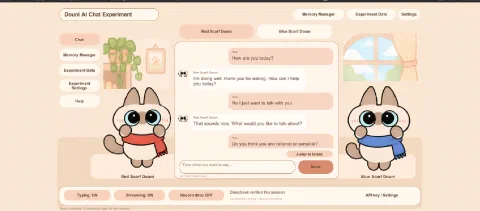
The original course example uses LLMUnity with a local model. My version uses Unity 6, with a local Node.js proxy connecting to the DeepSeek API. I kept the lab’s main HCI focus: how the interface communicates while the AI is preparing and displaying its answer.
- Typing ON: shows a waiting cue before the answer starts.
- Streaming ON: reveals the response progressively.
- Streaming OFF: presents the complete answer at once.
Ablation experiment: Typing × Streaming#
I tested the four possible combinations, using the switches visible along the bottom of the interface. The purpose was to separate the effect of knowing that the AI is working from the effect of seeing its answer gradually appear.
| Condition | Typing | Streaming | Screenshots | Interaction |
|---|---|---|---|---|
| A — Baseline | OFF | OFF | 5–10 | Answer appears all at once without a typing cue. |
| B — Typing only | ON | OFF | 11–16 | Typing cue first, then the complete answer. |
| C — Streaming only | OFF | ON | 17–22 | Answer appears progressively, without a separate typing cue. |
| D — Combined | ON | ON | 1–4 | Typing cue followed by progressive answer text. |
A — Typing OFF / Streaming OFF#
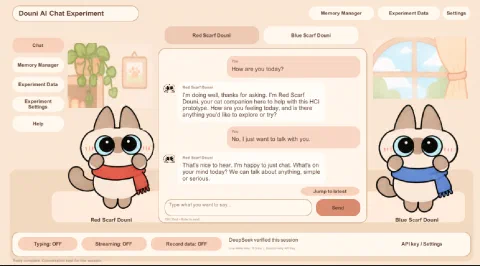
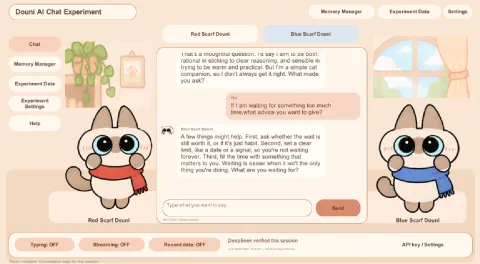
There is no typing cue or progressive text. The user waits for the complete reply. This is the simplest presentation, but it offers the least feedback during a longer wait.
B — Typing ON / Streaming OFF#
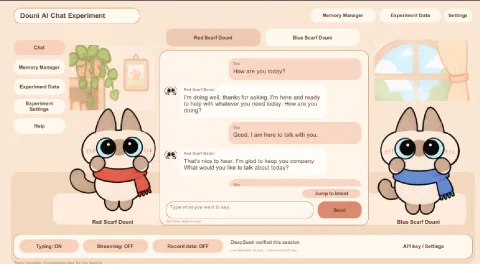
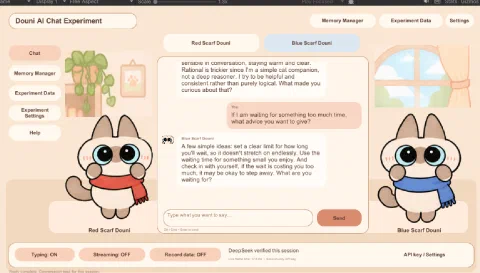
The typing cue communicates that the AI is working, even though the answer is still displayed as a complete block. It makes the waiting state clearer without changing how the finished response appears.
C — Typing OFF / Streaming ON#
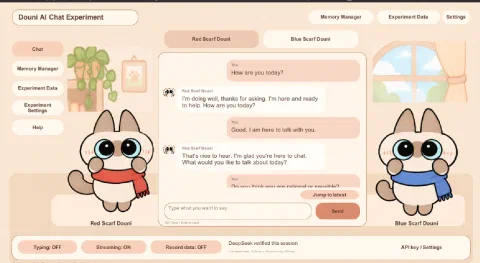
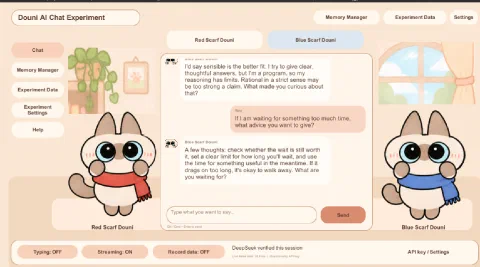
The response starts appearing as text becomes available, so the user can read before the entire answer is complete. However, there may still be an initial pause before the first text is visible.
D — Typing ON / Streaming ON#
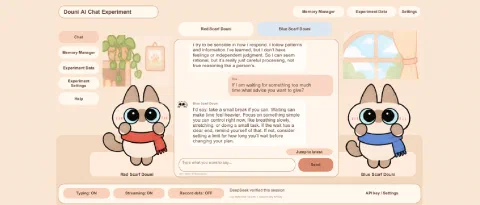
This combines feedback during the initial wait with progressive reading when the response arrives. It offers a smoother transition between waiting and reading, which was the main design motivation for testing both options together.
Answers to the two HCI exercises#
1. Does streaming reduce the experience of waiting?#
My observation: The visible output pace was approximately 30 characters per second. Longer responses naturally took longer to finish. With Streaming ON, users could start reading before the complete answer was ready. With Streaming OFF, they had to wait for the full response to appear.
This makes streaming useful for perceived responsiveness. The important distinction is between the time until the first visible text and the time until the whole answer is displayed. Streaming can improve the former without necessarily reducing the actual time needed to finish generating the answer. For longer replies, this distinction becomes especially noticeable: the user can follow an answer as it unfolds instead of staring at an unchanged chat bubble.
2. Does a typing indicator improve the interaction?#
My observation: With Typing ON, the interaction felt faster and smoother. The indicator immediately acknowledged that the AI was processing the request, making the waiting period less uncertain. Without that cue, the pause before the first text could feel less predictable. This did not mean the model actually generated text faster.
Conclusion: Typing and Streaming serve different purposes. Typing explains the waiting state; Streaming makes progress visible. Together, they provide a more continuous interaction experience.
These are qualitative observations, supported by the four interface conditions. The output rate is approximate; I did not use a logged latency dataset or a numerical satisfaction survey to quantify the differences.
User testing feedback#
Users tried the Douni interface and provided the following feedback:
| Aspect | Feedback |
|---|---|
| Visual design | The interface felt gentle and welcoming, making people interested in using it. |
| Two characters | Users noticed rational and emotional differences in how the red- and blue-scarf characters approached decisions, and saw value in using them for different questions. |
| Readability | The low interface resolution made text difficult to read and increased the difficulty of interacting with the app. |
The feedback showed that the character design was appealing, but text readability needs improvement. The distinct decision-making styles also gave users a reason to choose between the companions depending on their questions. However, the low-resolution text interrupted reading and made interaction more demanding. A friendly interface is not fully usable if people struggle to read the conversation.
Improvements and reflection#
My main priorities for the next iteration are:
- Improve resolution and readability: increase text size, check contrast, and adjust scaling and bubble layouts. I would test the updated UI at the actual display resolution, not only in the Unity Editor.
- Keep Typing and Streaming as complementary feedback: make the transition from waiting to displaying text clear.
- Measure latency more precisely: record time to first visible text and total response time for comparable prompts, controlling for answer length.
This lab showed me that a conversational AI is not only about the quality or speed of its answers. Clear feedback makes waiting easier to understand, while readable text makes the conversation usable. The two Douni characters also demonstrate how visual personality can make users more willing to interact with an AI system. My next step is to preserve the gentle style and character differences while making the conversation easier to read.